
SLV Adds Local Mode — Manage Solana Validators and RPC Nodes Directly on the Machine You SSH Into, with AI Agents. The Ideal Migration Path for solv Users
SLV Adds Local Mode — Manage Solana Validators and RPC Nodes Directly on the Machine You SSH Into, with AI Agents. The Ideal Migration Path for solv Users
ELSOUL LABO B.V. (Headquarters: Amsterdam, Netherlands, CEO: Fumitake Kawasaki) and Validators DAO have released the latest version of SLV (slv 2026.4.3.1005), the open-source Solana development toolkit, now with local mode support.
Until now, SLV operated as a management node that controlled remote nodes. With this release, SLV can run directly on the node you SSH into, managing that node itself. Simply select local mode in the
slv onboard wizard to complete setup.SLV Official Site: https://slv.dev/en
Getting Started: https://slv.dev/en/doc/general/getting-started/
Why Local Mode — Eliminating an Extra Hop of Complexity
Remote management is powerful when operating multiple nodes from a single control point. However, managing Solana validators and Solana RPC nodes already carries significant cognitive load on its own. Adding a remote management layer on top further increases that complexity.
Local mode eliminates this extra hop. SSH into the node, run SLV directly on it. When the management target and execution environment are the same machine, the setup is simpler and the operation becomes intuitive.
In most cases, Solana node operation starts with a single machine. Few operators begin with multi-node remote management from day one. Starting with local mode is the more natural path.
From Local to Remote — Migrate Gradually While Preserving Your Configuration
SLV's local mode is designed with future scale-up in mind.
Environments built in local mode can transition to remote management as your operation grows. You can carry over your configuration and gradually scale from single-node direct management to Ansible-based multi-node orchestration.
There is no need to design for large-scale infrastructure from the start. Begin with the one machine in front of you, and move to remote management when the time comes. This incremental growth path is SLV's design philosophy.
The Migration Path for solv Users — Carrying Forward the Original Design Philosophy
SLV's predecessor is solv, developed by Epics DAO. solv earned a loyal following for its straightforward approach: install it directly on the node and manage that single machine hands-on. Even though updates have been discontinued, solv is still in active use today.
SLV's local mode inherits this design philosophy — the intuitive directness of managing the node you are logged into. You can maintain the local execution style familiar from solv while gaining access to all of SLV's capabilities: natural language operation via AI agents, an MCP-compatible toolset, and continuous tracking of the latest Solana client versions.
Since solv updates have ended, migration is necessary to keep up with Solana network upgrades. Working with SLV's AI agent makes the migration process smooth and guided. We recommend migrating early to stay on track with future updates.
AI Console — Natural Language Operations in Local Mode
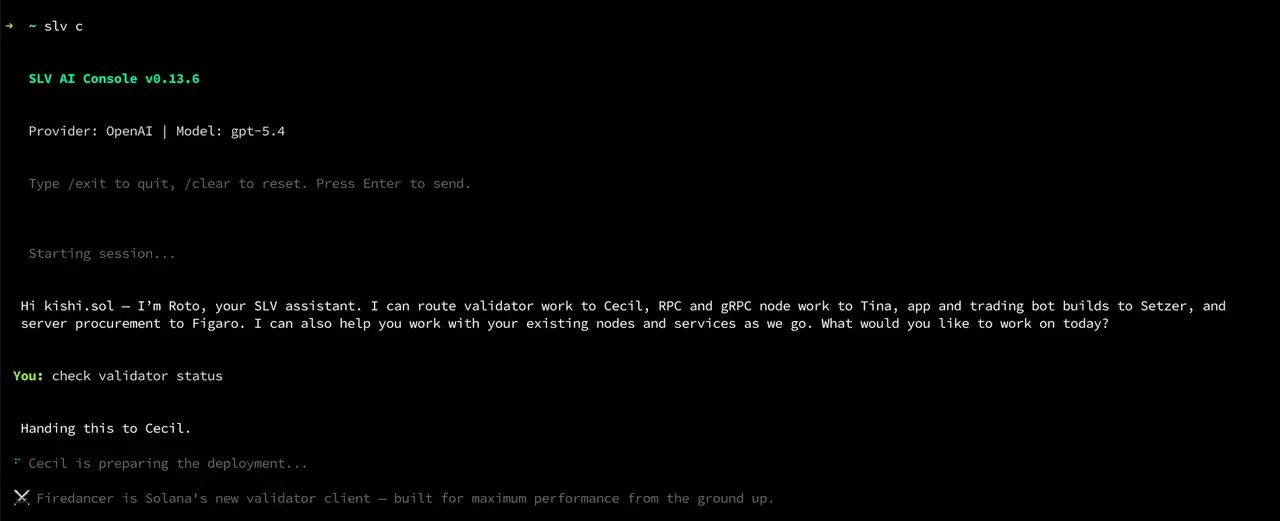
The AI Console, launched with
slv c, works in local mode just as it does in remote mode. The AI agent does not run on the local machine itself — it connects to external high-performance models (ChatGPT / Claude), so it has no impact on node resources.Validator deployment, upgrades, downgrades, identity switching, Solana RPC node setup, Solana Geyser gRPC configuration — all of these can be executed simply by talking to the AI agent on the node you are logged into. On startup, the AI Console automatically checks for the latest versions of agave, jito-solana, firedancer, yellowstone-grpc, and displays available updates.
With the AI agent residing on the node, the same setup extends beyond operations into Solana application development. Code generation through deployment can be completed on the node through conversation with the AI, and SLV AI handles environment migration when needed.
Setup in Minutes
There are two ways to get started with local mode.
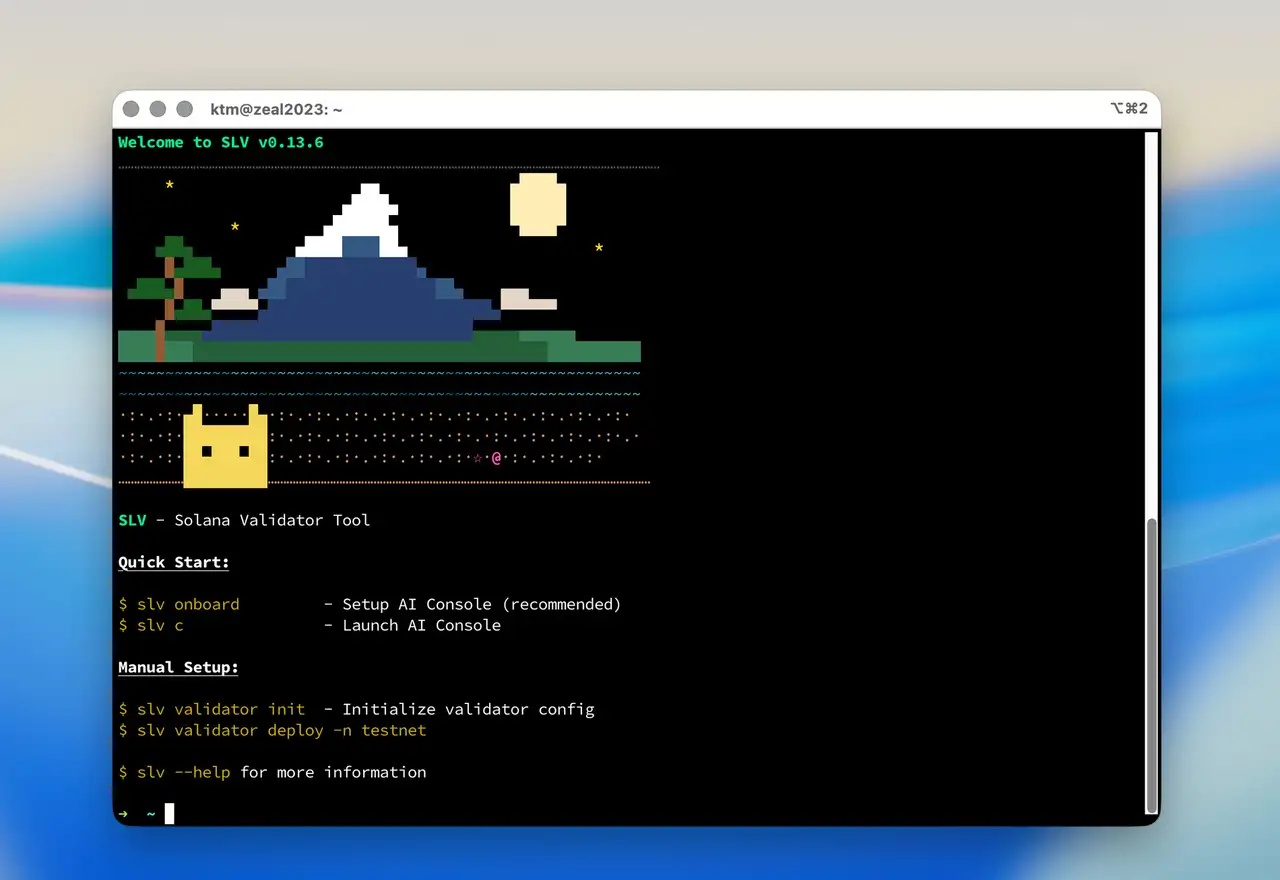
The simplest is to select local mode in the
slv onboard wizard. The wizard walks you through connecting your AI provider, selecting a model, and configuring available skills — all in one flow. You can also configure it via the CLI by specifying localhost, which is a convenient option for users already familiar with SLV.Either way, the time from installation to natural language operations is just a few minutes.
YouTube: "Deploy a Solana Validator with ZERO Coding — SLV AI Does It All":
Supported Clients and Roadmap
SLV currently supports Agave, Jito Agave, Firedancer, and Jito Firedancer.
Upcoming updates will add support for DoubleZero configuration and AllNodes Client (an optimized validator client provided by AllNodes, running on the AllNodes environment). Both have been frequently requested by users, and we are targeting availability within this month to next month.
Combining with the ERPC Platform
Deploying your SLV-built environment on the ERPC platform gives you high-speed snapshot downloads over internal network paths, zero-distance communication with Solana validators, and Solana-optimized configurations from day one. Solana RPC, Solana Geyser gRPC, Solana Shredstream (Epic Shreds), bare metal servers, VPS, and Global Storage are all integrated within the same platform.
ERPC Official Site: https://erpc.global/en
Open Source
SLV continues to be provided as open source. Validator operations, Solana RPC deployment, application development — everyone involved in Solana operations can use SLV's AI agent environment at no cost.
Thank you for using SLV. We will continue developing to provide an environment where AI agents can support your node operations.
SLV GitHub: https://github.com/validatorsDAO/slv
Contact
For inquiries about SLV and ERPC, please create a support ticket on the Validators DAO official Discord.
Validators DAO Official Discord: https://discord.gg/C7ZQSrCkYR
Links
- SLV Official Site: https://slv.dev/en
- SLV Getting Started: https://slv.dev/en/doc/general/getting-started/
- SLV GitHub: https://github.com/validatorsDAO/slv
- ERPC Official Site: https://erpc.global/en
- Epics DAO Official Site: https://epics.dev/en
- Validators DAO Official Discord: https://discord.gg/C7ZQSrCkYR
News